Paddle’s receipt email may only list this ID clearly in the PDF attachment. Copy it here for Word Journal: Chrome extension → Preferences → Activate, or the Mac app purchase / license screen.
macOS · Chrome Extension
Less tab-switching, More vocabulary while you read & watch.
Word Journal isn’t a dusty dictionary — it’s a next-generation vocabulary app. New launch: try it free for 14 days.
Look up words anywhere — popups beside your selection in Safari, PDFs, Mail, and most apps.
Watch
YouTube with a focused player, caption highlights by level, and timed definition cards in fullscreen.
Explore
Two Words of the Day plus AI-suggested picks with photos — tap through to full definitions.
Every vocabulary tool you need in one app
Each part of Word Journal is built for real workflows: reading articles, watching videos, a redesigned Chrome new tab, and saving words you care about — without juggling browser tabs.
Explore
Words of the Day & AI picks
AI recommends words based on your recent lookups and saves.
Save the words you like; dismiss the words you don't like
Tap a card to open the full definition, same as lookups elsewhere
System-wide
Popups where you read
Select text in Safari, PDFs, Mail, or any app — a definition card appears beside your selection with pronunciation, meanings, and add-to-journal.
AI-generated explanation, along with synonyms and antonyms
No more juggling between tabs
Lemmatization so “running” resolves to “run”
Watch
YouTube vocabulary while you watch
Create an immersive vocabulary learning experience as you watch your favorite YouTube videos.
Small word card popup automatically based on your English level
Click the word in captions for a full definition panel
Journal
Save words & export your list
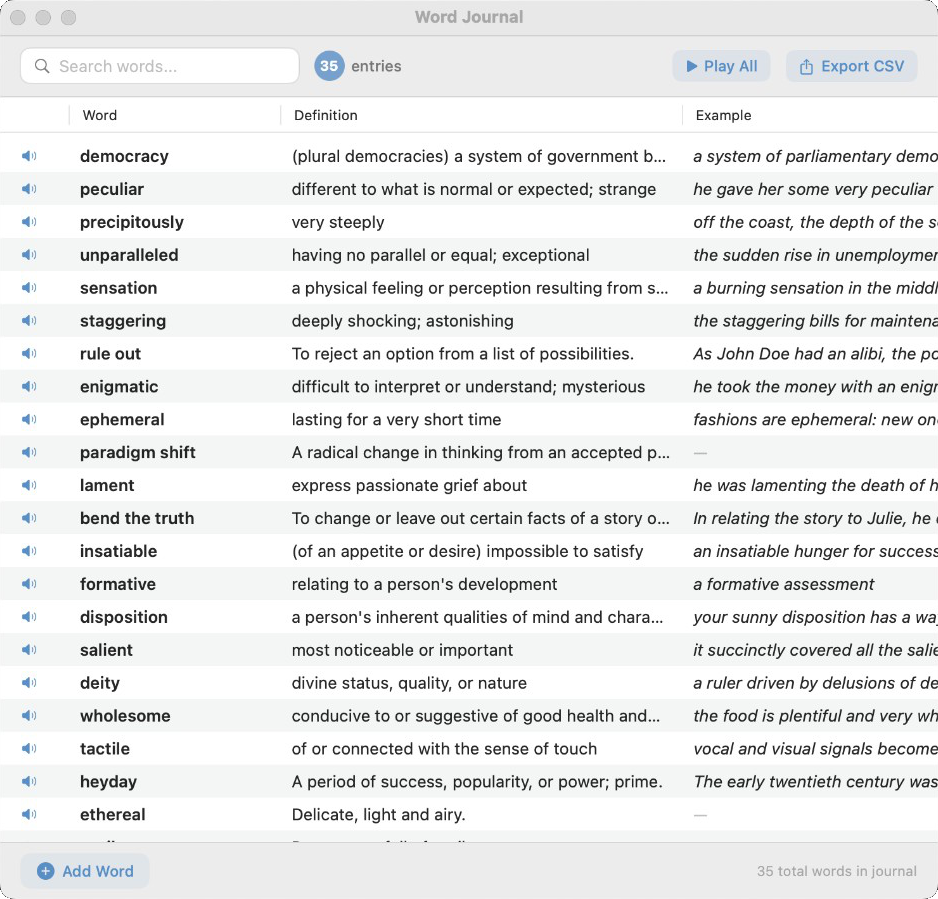
Build a personal vocabulary table: search, sort, play pronunciations, and export to CSV when you want to study elsewhere.
Review the words you saved
Make edits as you like
Chrome
New tab, redesigned for vocabulary
Customize your Chrome tab to learn vocabulary immersively, with an aesthetic design.
Quick access to Words of the Day & recommendations
Look up a word or open your journal without leaving the flow of browsing
Simple, transparent pricing
Get Word Journal on your Mac
Download includes a 14-day full-feature free trial. After that, unlock everything with a one-time $4.99 purchase (see below — 50% off the $9.99 list price).
Free
Full app for 14 days free — then buy a one-time license or enter a key when you’re ready.
$0 · download
14-day full-feature trial from first launch (no credit card)
Core features: lookups, journal, Watch, Explore
Optional AI with your own API keys
Upgrade anytime with a one-time purchase (or paste a license key)
Secure checkout with Paddle. By purchasing you agree to our Terms of service.
Frequently asked questions
No. Dictionary lookups use macOS Dictionary (and optional online sources). AI insights, recommendations, and AI art for Words of the Day only run if you add keys under Preferences → AI.
Word Journal reads your text selection and listens for global shortcuts so it can show the definition popup without you copying and pasting. You can change triggers in Preferences.
It embeds the watch experience in-app. With captions on, you can highlight words by level and open definitions; in fullscreen, optional timed cards can track the active caption line when native cues are available.
For the new launch, you get 14 days of full access from your first launch after installing the app. When the trial ends, use the Buy now one-time purchase (web + Paddle) or enter a valid license from your receipt to keep full access.
Use Download for macOS to get the latest WordJournal-2.2.dmg (drag the app to Applications). Use Download for Chrome for the extension from the Chrome Web Store. The full app uses a one-time $4.99 purchase (launch offer) via secure Paddle checkout — see Buy now in pricing above.